
Sprites: small assets that bring a website to life
Lazy Read
A sprite is a 2D graphic that can move or animate through a few frames. The article explains how to design it for its actual display size, organize its animations and integrate it into a website. AgentRepo shows how SVG and PNG characters can coexist, individually or in pairs, alongside a reusable skill. Three.js and sprites can also belong to the same experience.
- What a sprite is and how it animates
- Design, scaling and accessibility
- One or two characters on a website
A sprite is a 2D graphic that can be drawn, moved or animated independently. It might be a character, a coin in a game or a small reaction inside an interface. It does not have to be pixel art: that is a stylistic choice.
AI is making ambitious visual interfaces more accessible to explore. The enthusiasm for 3D and tools such as Three.js has good reasons behind it: they enable experiences that once required substantial specialist work. Other techniques also remain useful for particular problems, and they deserve attention too.
Sprites have been around for decades. The original Commodore 64 programming manual already explained how to draw, move and animate them. What interests me is what we can still build with that idea on a modern website.
A small image can have plenty of personality
A mascot can look around, think or celebrate without hundreds of images describing every movement. We can change its eyes, move its head by a pixel or alternate a few poses. The intention behind a movement matters as much as the amount of detail.
A spritesheet groups those images together. The program displays a region of the sheet, then changes regions at the animation's chosen rate. One file can contain idle, thinking, surprise and travel clips.
AgentRepo's new characters use 32 × 36 pixel cells, eight columns and eight rows. The full sheet measures 256 × 288 pixels. There are 31 active frames across eight clips; unused cells are transparent. This is our project's contract, rather than a mandatory sprite format.
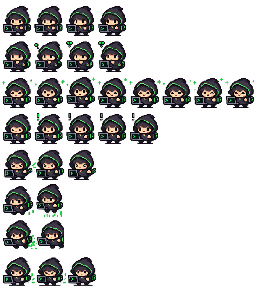
Selecting a frame from a regular grid requires two coordinates:
x = column × cell width
y = row × cell height
CSS, an SVG viewport or Canvas drawImage can display that region. The choice depends on the application and the number of objects we need to control.
Creating a sprite that works on a website
Start by deciding its display size. A face that looks detailed in a large image may lose its features when reduced to a header. Work on the final grid early, checking the silhouette, contrast and accessories at their intended size.
Then prepare the poses. An effective idle animation might need only a glance or subtle breathing. A jump needs space around the character: effects outside the cell will be clipped. Keeping scale and outlines consistent also prevents accidental changes in the character's shape between frames.
AI can help explore concepts, but downscaling a generated image does not guarantee a good result. Pixels, hands, accessories and continuity still need inspection. A dimension validator cannot do that artistic work.
In pixel art, enlarging from 32 to 64 pixels can repeat each source pixel as a 2 × 2 block. An enlarged export adds no detail. A small expressive mascot therefore does not require a 4K texture. Its final scaling still needs checking: CSS dimensions, display density and zoom affect its appearance. MDN describes image-rendering, including how non-integer sizes are handled.
AgentRepo: drawing, animation and interaction
AgentRepo's original mascot uses small TypeScript character grids as editable artwork, with a palette and layers for its body, head and expressions. Each animation combines those layers into poses. The renderer groups pixels of the same colour into SVG paths; exported PNGs are derived assets.
The four new characters use PNG sheets. Separating the drawing choice from the animation clock lets us support both representations: the original mascot keeps its renderer, while new characters select frames from an atlas. The reference implementation lives in packages/avatar.
We have also prepared one- or two-character scenes suited to the content: development, security, research or communication. Each character keeps its animation, and readers choose which contribution to open. The floating mascot gives way while the inline scene is visible, then returns when it leaves view. Characters can accompany the reading without stacking messages or taking over the page.
The integration includes less conspicuous but necessary behaviour: reserving layout space, stopping timers offscreen, pausing in hidden tabs and respecting reduced-motion preferences. Messages open with the keyboard and remain readable text without animation.
Where Three.js fits
When an experience needs geometry, lighting or spatial navigation, Three.js provides suitable tools. It also has a Sprite class, a textured plane facing the camera. Both techniques can coexist in the same scene.
The useful decision is what we want to communicate and which resources the experience needs. A sprite is not automatically lighter either: frame counts, image dimensions and implementation all matter. Measure the actual transfer and behaviour on the devices where it will run.
A skill for reproducing the process
The Web sprites skill brings together the creation and integration process: choosing a representation, preparing frames, defining clips, coordinating characters and checking accessibility and behaviour. It includes an atlas validator with file and decompression limits, and uses AgentRepo as a case study.
Read version 0.1.0 of the skill
Browse the skill files on GitHub
Giving a website personality also means choosing its small details well. A recognisable character, a timely reaction and a few frames can contribute a lot to the experience.